
CRM system for companies with multiple warehouses or branches
Facts checked: 2026-11-12
A customer is standing at the counter asking for a specific product. The clerk checks -- not here. Calls another store -- nobody picks up. Calls a third -- the employee doesn't remember whether it's already sold out and walks over to check the shelf. Five minutes later, the customer has left. When a company runs more than one warehouse, store or branch, the real problem isn't the product itself -- it's that nobody can see, at the same moment, where it actually is. Moving stock between branches often gets tracked verbally, or on a sticky note that gets lost, and then an item "vanishes" for weeks, simply sitting in another warehouse with nobody aware of it. This page explains how DSOLVER CRM lets you see every branch's stock at a glance, so the answer to that customer takes a second, not three phone calls.
Why single-warehouse logic stops working here
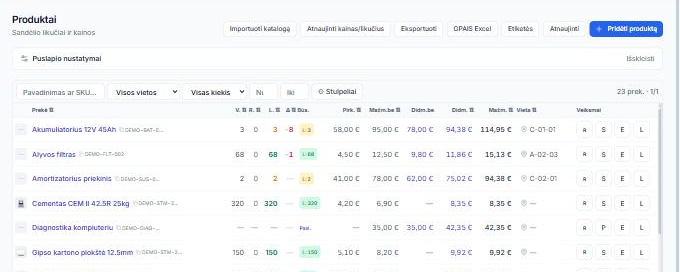
A combined total says nothing about where a product actually is. The system might show "stock: 12" -- but if 8 of those sit in the central warehouse and 4 are in another city, that combined number is nearly useless to a clerk at the counter unless they can instantly see exactly which location holds which units.
A transfer between branches is easy to forget to document. A driver grabs a box from one warehouse to drive to another, and until that's recorded in the system with a date and a responsible person, both branches can end up assuming the stock isn't theirs -- or, just as easily, that it still is, when it's already gone.
A customer can't wait for an employee to find the answer. Finding a product "by phone call" means the customer stands at the counter while someone in another city picks up, gets up from their desk, and checks a shelf. Every minute of that is a chance the customer simply walks out to a competitor.
Each branch has its own team, but the data has to stay unified. If every branch runs its own spreadsheet, or even its own separate system, the company-wide picture -- how much stock actually exists, where it needs restocking, where there's a surplus -- simply doesn't exist without manually compiling it at month end.
What DSOLVER CRM actually does
Each product's stock is visible separately per warehouse or branch, with a combined total calculated automatically -- a clerk sees not just "12 in stock" but "8 here, 4 in another city."
Moving stock between warehouses is recorded in the system as its own action, with a date, quantity and a responsible person -- there’s no room left for a "verbal agreement" that one of the two branches forgets or reads differently.
Every branch works off the same shared database in real time -- a salesperson in one city instantly sees the stock in another, with no phone call and no waiting.
A new warehouse or branch connects to the same system with no separate data copy -- growth doesn't mean building a new, isolated data island.
Setting up a new branch, labels for every stock location are generated and printed in one action -- no hand-making and printing each shelf tag separately.
A stock count at any branch runs by scanning only, with no manual number entry -- the system shows what matches, what's missing and what's surplus before the count is even finished.
What this actually changes day to day
- You answer a customer at the counter in a second, not after three calls to other branches
- An order from any branch reserves the item the same second across the whole system, in real time -- another branch can’t promise it to a different customer at the same time
- A stock transfer carries a date, a quantity and a responsible person -- no more "it got lost somewhere" explanations
- A clerk in one location instantly sees exactly which other location holds the item they need, with no call to a colleague
- Management sees one real, combined stock figure across all branches, not one assembled by hand from several separate files
- Opening a new branch or warehouse doesn’t mean building a new, separate data system -- it all plugs into the same one
- Fewer situations where one branch sells an item that’s actually already gone, because it had just been moved elsewhere
- Need a new branch added or a new warehouse rule? Changes happen in days, not months, the way they would on a classic system
Who this is for
- Companies with several stores or pickup locations
- Retail chains with a central warehouse and regional branches
- Service companies with several branches where parts or products are stored in different locations

Is this relevant to you: a quick test
If you answer "yes" to at least two of these, a multi-warehouse management solution is worth considering:
- □Do you have to call another branch to find out whether a product is there?
- □Is moving stock between warehouses currently tracked only verbally or in a spreadsheet?
- □Do you have more than one warehouse, store or pickup location?
- □Is it hard to state the combined stock across all branches for a specific product within seconds?
Frequently asked questions
Can I see exactly which location holds a product?
Yes, each product's stock is visible separately per warehouse or branch, with a combined total calculated automatically.
Is moving stock between warehouses tracked in the system?
Yes, a transfer is recorded as its own action, with a date and a responsible person.
Do all branches see the same data in real time?
Yes, every branch works off the same database with no separate sync step.
Can I add a new branch later?
Yes, a new warehouse or branch connects to the same system with no data duplication.
Which plan includes multi-warehouse management?
Multiple warehouses/branches, per-location stock and transfers between them are part of the Business plan (€349/mo). The B2B self-service partner portal (shown in the screen example) is part of the Enterprise plan (from €699/mo). The first 2 months are free to trial the standard system.
Related pages
Do you have several warehouses or branches?
In a short call, tell us about your branch count and layout -- we'll show you how it would look in your own process.